Upscale seamless patternswithout breaking the repeat
A pattern upscaler that treats your tile as a tile. Enlarge 2×, 4× or 6× — up to 18,432 px per edge — and get a file that still repeats edge to edge. Built for wallpaper, fabric and packaging print.
Why ordinary upscalers break a seamless pattern
A general-purpose upscaler looks at your tile as one photograph. At the edges it has no idea what comes next, so it invents it — a fuzzy border, drifted edge pixels, hallucinated detail. On screen that is invisible. Repeated across a wall it becomes a grid of visible seams.
Your tile was seamless before the upscale. The only thing that should change is the resolution — and with an ordinary upscaler, that is not what happens.
Built for repeats, not photographs
The repeat stays a repeat
The tile you upload comes back 2×, 4× or 6× larger and still tiles edge to edge, exactly as it did before.
Nothing to configure
Pick a scale. No masks, no manual edge cleanup, no re-tiling afterwards.
Check before you spend
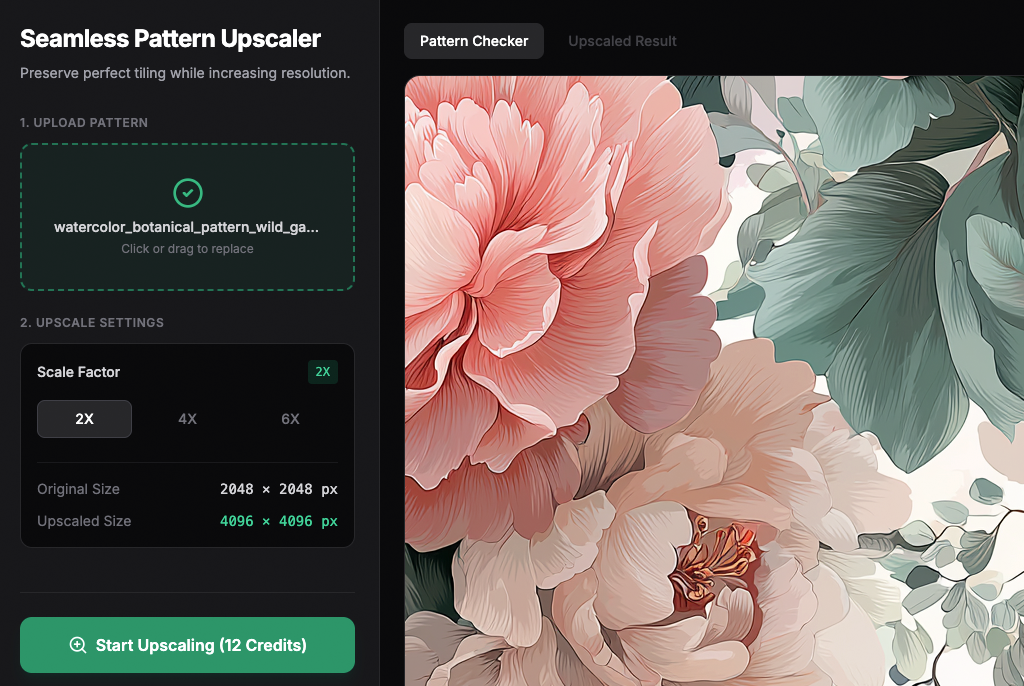
The Pattern Checker previews the tiled result and toggles seam lines, so you upscale a tile you have already verified.
What you get
- Scales: 2×, 4×, 6× — up to 18,432 px per edge (scales a file cannot use are greyed out)
- Input: PNG or JPG — one repeat, not a pre-tiled sheet
- Pattern Checker: preview the tiled result and toggle seam lines before you spend a credit
- Output saved to your gallery, downloadable at full size
Same tile, same 4× — with and without the seam
Both crops come from the same source tile, enlarged 4×, laid out 2×2, and cut from the same region around the point where four copies meet. With a general-purpose upscaler the veins jump and a brightness step runs through the middle, horizontally and vertically. With WallMockup the same veins run straight through the boundary.


Crops are shown at 2× zoom with no smoothing. The tile edges meet between the dashed lines.
How many pixels does your repeat need?
Print resolution is pixels divided by physical width. Most wallpaper printers ask for 150–300 DPI at final size, so a repeat width and a target DPI tell you the file you need — and how far a source tile has to be enlarged.
| Repeat width | 150 DPI | 300 DPI |
|---|---|---|
| 21″ (53 cm) | 3,150 px | 6,300 px |
| 24″ (61 cm) | 3,600 px | 7,200 px |
| 27″ (69 cm) | 4,050 px | 8,100 px |
| 36″ (91 cm) | 5,400 px | 10,800 px |
A 3,000 px tile printed at a 24″ (61 cm) repeat is 125 DPI. At 6× it is 18,000 px — 750 DPI at the same width, or a 60″ repeat at 300 DPI.
Questions
What is a seamless pattern upscaler?
An upscaler that knows the image is a repeating tile. It enlarges the tile while keeping the left/right and top/bottom edges continuous, so the result still tiles without a visible seam.
Which scales can I use?
2×, 4× or 6×, as long as the output stays within 18,432 px per edge. The tool greys out any scale your image cannot use.
Which files are accepted?
PNG or JPG. Upload the tile itself — one repeat — not a pre-tiled sheet.
How much does it cost?
It uses credits from your plan, priced by output size. The exact number is shown on the button before you start; nothing is charged until you confirm.
Can I check the tiling before I spend credits?
Yes. The Pattern Checker previews the tiled result and lets you toggle seam lines to see exactly where the edges meet.
Does it fix a pattern that already has a seam?
No. The tool preserves a repeat that already tiles seamlessly while enlarging it; it does not repair a broken one. Run the Pattern Checker first — if the seam lines show a mismatch, fix the source tile before upscaling.
Ready to print without seams?
Upload one repeat, pick a scale, and download a print-ready tile.
Try it with your welcome credits